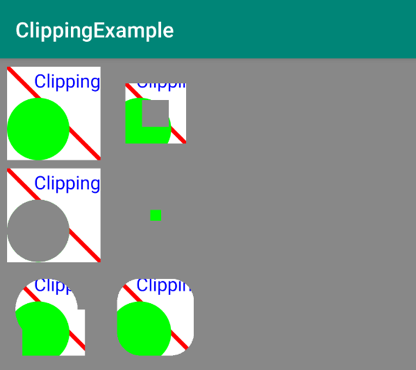
19. Implement drawRoundedRectangleClippingExample
23 19 AAK DrawRoundedRectangleClippingExample SC
Android Developer Documentation
- At the class level, create and initialize a rectangle variable. RectF is a class that holds rectangle coordinates in floating point.
private var rectF = RectF(
   rectInset,
   rectInset,
   clipRectRight - rectInset,
   clipRectBottom - rectInset
)- Inside the class, implement the function
drawRoundedRectangleClippingExample().
javascript
private fun drawRoundedRectangleClippingExample(canvas: Canvas) {
   canvas.save()
   canvas.translate(columnTwo,rowThree)
   path.rewind()
   path.addRoundRect(
       rectF,clipRectRight / 4,
       clipRectRight / 4, Path.Direction.CCW
   )
   canvas.clipPath(path)
   drawClippedRectangle(canvas)
   canvas.restore()
}
What's happening in the code:
- The addRoundRect() function takes a rectangle.
- Values for the x and y values of the corner radius.
- The direction to wind the round-rectangle's contour.
- Path.Direction specifies how closed shapes (e.g. rects, ovals) are oriented when they are added to a path.
CCWstands for counter-clockwise.
When you run your app it should look like this: